


2026 Agency Workflow Guide · Luis Chavez, Velautec Media
The best SEO tools for agencies in 2026 are the ones that help you move from a search opportunity to a real client outcome. At Velautec Media, we approach SEO technology through a practical lens: can it help a business become easier to find, generate better enquiries, and understand which work is driving progress? The answer usually comes from combining a few reliable tools—not buying every subscription on the market.
This guide breaks down ten core platforms, explains what each does well, and shows how an agency can connect keyword research, technical SEO, visitor behavior, conversion tracking and AI-supported analysis. We also cover five useful additions for reporting and experimentation. It is a workflow-based comparison, not a claim that every tool has been benchmarked in identical conditions.
Interface screenshots are included to help illustrate the workflows discussed. Actual features, dashboards, pricing and availability may change.
The Short Answer: Which SEO Tools Does an Agency Really Need?
For most service-business and B2B SEO campaigns, begin with Google Search Console for organic-search evidence, Google Analytics 4 for conversions, and Microsoft Clarity for visitor behavior. Add Screaming Frog when technical audits become important. Then choose a research suite such as Semrush or Ahrefs when competitor and backlink intelligence justifies the cost. Use an AI assistant to speed up analysis, but keep human review between its suggestions and anything published for a client.
Velautec principle: Measure search visibility, the quality of enquiries, and the actions your team took. Rankings alone do not tell a client whether marketing is creating business.
Table of Contents
- 10-tool comparison and recommended roles
- How to evaluate agency SEO software
- The 10 core SEO tools and example workflows
- Five additional tools worth considering
- Recommended stacks by agency type
- An SEO workflow from search data to leads
- What we would show a client
- Frequently asked questions
10 Best SEO Tools for Agencies in 2026: Comparison
Each platform solves a different operational problem. A tool that is excellent for technical auditing may be a poor choice for reporting revenue; the reverse is also true. The following comparison is based on the capabilities described in this guide, rather than an exact universal ranking.
| Tool | Best agency use | Suggested role |
|---|---|---|
| Rankability | Coordinating SEO content, audits and search visibility | Campaign workspace |
| Google Search Console | Real Google search queries, indexing and page data | Essential first-party source |
| Google Analytics 4 | Leads, key events, traffic quality | Conversion measurement |
| Microsoft Clarity | Session recordings, heatmaps and friction | Experience diagnostics |
| Ahrefs | Competitor keywords, backlinks and link opportunities | SEO research suite |
| Semrush | Keyword gaps, competitor research, backlink gaps | SEO research suite |
| Screaming Frog | Technical crawling, architecture and content inventory | Technical auditing |
| PostHog | Product journeys, funnels and behavioral events | Advanced measurement |
| Claude for visual assets | Explaining ideas through branded diagrams and graphics | Content production aid |
| ChatGPT / Claude / Codex | Analysis, automation and structured SEO tasks | AI-assisted operations |
How to Choose SEO Software Without Building an Expensive Stack
The purchase decision should start with the work you must deliver, not a feature-count comparison. A local contractor with one website needs a different setup from an agency coordinating fifty client properties across several countries. Before subscribing, map the software to a measurable deliverable and to the people who will use it.
- Data reliability: Can you distinguish verified first-party results from a platform’s estimates?
- Useful decisions: Does a report make the next action obvious, or just add charts?
- Client fit: Do the features match local SEO, B2B lead generation, ecommerce, or another actual service?
- Team capacity: Can your specialists keep the data and workflows clean each month?
- Integration: Can it connect search, analytics, crawling and conversion data without unnecessary manual exports?
- Commercial value: Will it help you protect margin, shorten diagnosis time or improve the quality of client opportunities?
You can often avoid subscription overlap. For instance, Ahrefs and Semrush both support competitive SEO research, so many small agencies can pick one as their primary suite. Likewise, a client already comfortable with Looker Studio may not need a separate premium reporting portal on day one.
The 10 SEO Tools: Strengths, Limits and Agency Use Cases
1. Rankability — A Campaign-Centered SEO Workspace
Rankability approaches SEO through connected campaign workflows rather than isolated keyword charts. Its value proposition is especially relevant to an agency that wants to keep content planning, page reviews, visibility monitoring and follow-up work closer together. That does not automatically make it the right platform for every account, but it is worth evaluating when too many disconnected spreadsheets slow the team down.
One useful question for any campaign management product is: Can a strategist see what changed, understand why it matters and hand off a specific task? If the platform supports a smooth chain from research to execution, it can reduce the time between discovering a problem and acting on it.
Where agencies can benefit
- Group websites, pages and campaigns so that analysts can move between clients without losing context.
- Use on-page reviews to check content quality, structure and supporting evidence—not simply keyword frequency.
- Monitor visibility across available search surfaces and keep a historical record when pages are updated.
- Compare audit feedback with real Search Console and conversion data before changing a page.
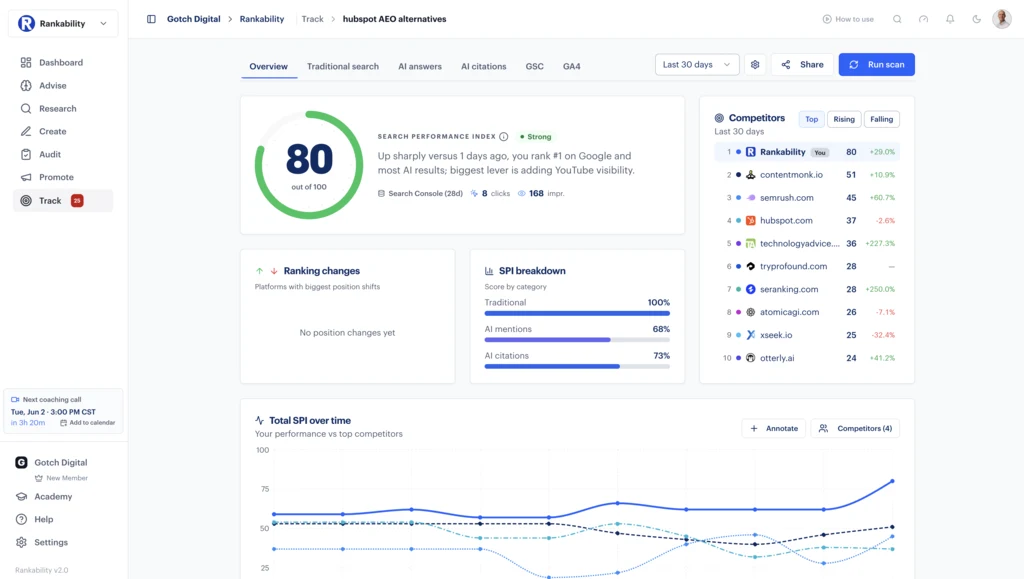

Agency scenario: A manufacturing client has three service pages attracting impressions but few qualified enquiries. The strategist can review their page structure, competitor coverage and tracked visibility, then produce separate briefs for content improvements and conversion testing. The client receives a plan tied to demand, not a generic SEO score.
Watch out for: replacing independent measurement with a proprietary score. Treat scores as signals for diagnosis; validate important conclusions against search, analytics and business data.
2. Google Search Console — Your Most Important Search Evidence
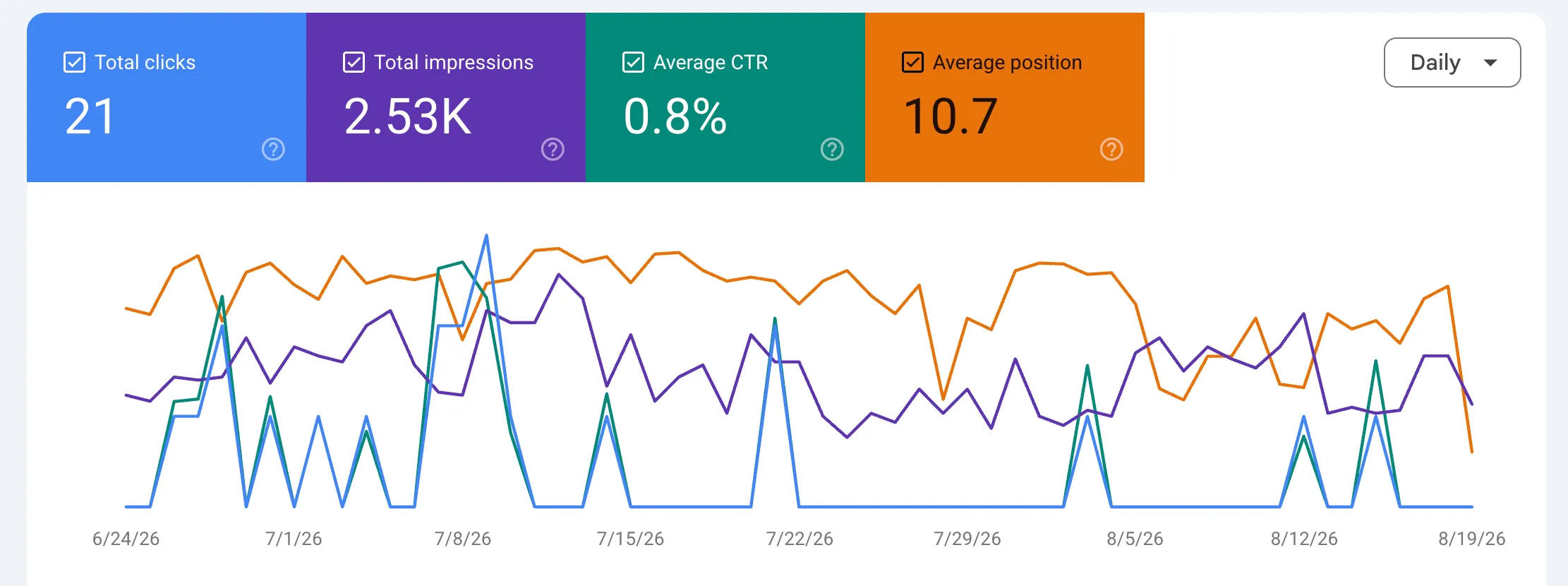
Google Search Console is foundational because it reports how your verified property performs in Google Search. You can inspect queries, clicks, impressions, average positions, indexing status and other signals that can guide priorities. Unlike a competitor tool, it observes your site’s own search performance directly, although its reports and averages still have limitations.
Begin by comparing a meaningful period to the preceding one, then segment branded and non-branded queries, important pages and target countries. A drop in total clicks is worth investigating, but a change on a high-intent service page is typically more commercially urgent than movement on a broad informational query.
Find high-intent opportunities beyond page one
Filter search queries for the actual services or products your customers buy. A query with impressions and a weak average position can indicate existing demand that has not yet turned into meaningful visibility. Check whether the current landing page matches the intent before building another URL.
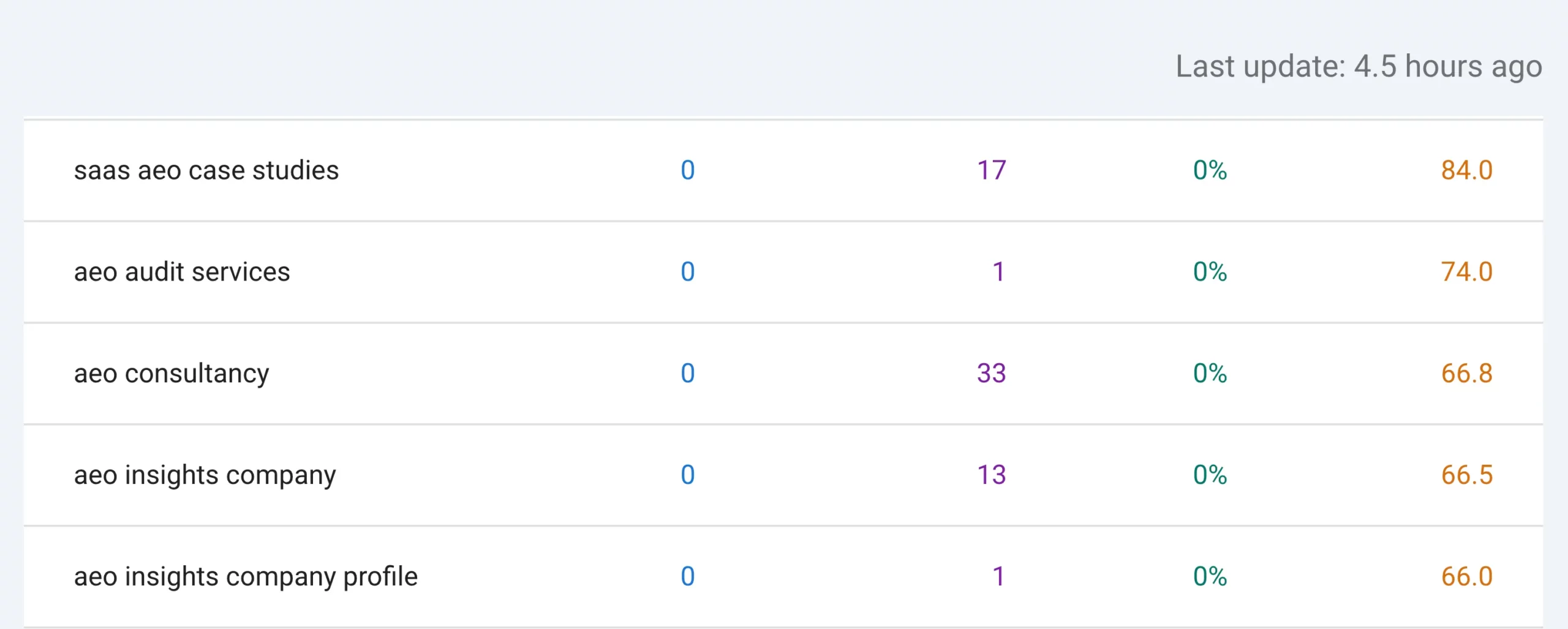
Identify queries where small improvements might matter
Some pages already appear for relevant searches but do not receive many clicks. Review the search results, competitors, title and meta description, relevance of the page, and possible internal links. Prioritize queries based on commercial relevance—not simply because their average position is close to ten.
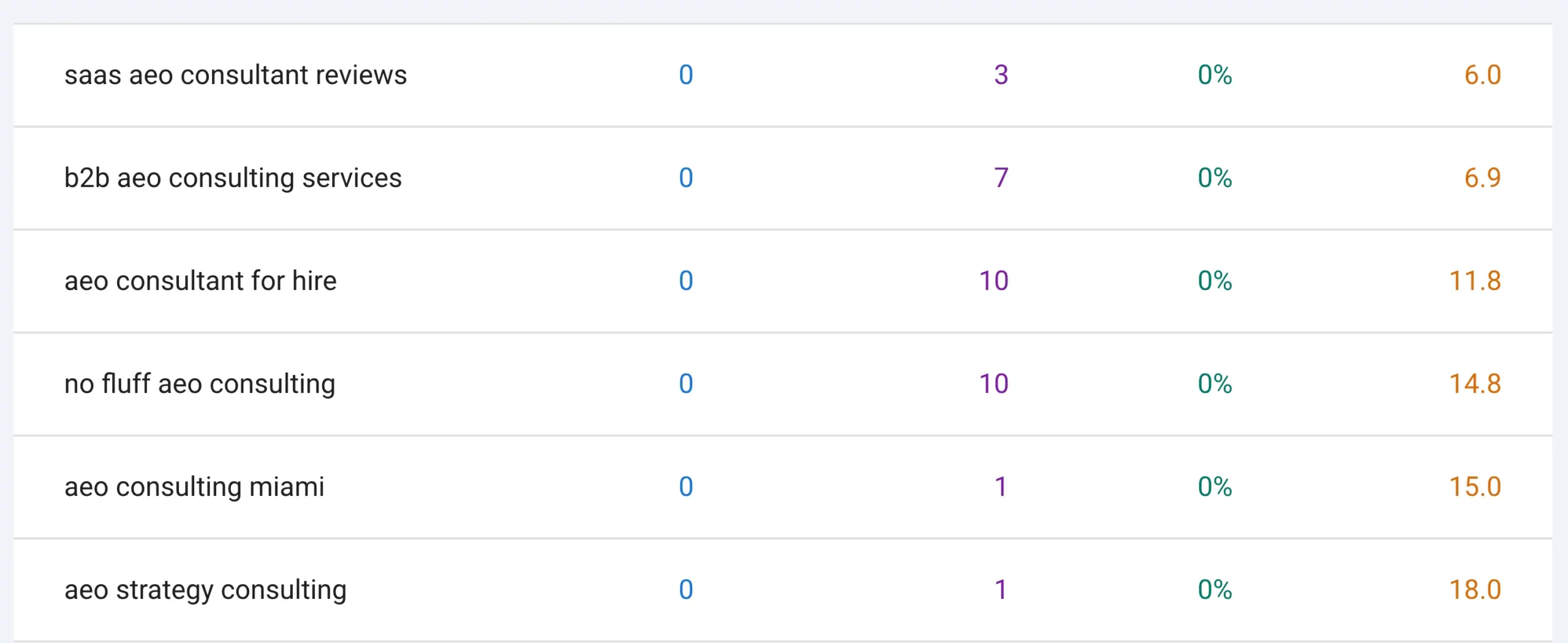
Agency scenario: A construction client appears for “industrial warehouse construction” searches, but visitors land on a generic homepage. This is a reason to investigate whether a dedicated industrial service page could answer the query more effectively.
Watch out for: interpreting average position as a fixed rank. Search Console metrics are aggregated and can vary by location, device, query mix and search features.
3. Google Analytics 4 — Connect SEO to Business Results
Google Analytics 4 helps turn acquisition data into a view of what visitors do after arriving. For an SEO agency, the real benefit is not seeing a bigger traffic chart; it is understanding whether visitors request quotes, start forms, make calls or complete another valuable action. This is especially important for contractors, industrial suppliers, healthcare practices and other lead-based businesses.
Set up events that represent genuine enquiry intent. Examples include a successful contact-form submission, a quote-request completion or a qualified call event collected through an appropriate call-tracking setup. Label important events as key events and test that they fire correctly. Clicking a phone number alone is an interaction, but it is not proof that a lead was qualified.
- Acquisition: Which landing pages attract organic-search visitors?
- Engagement: Where are visitors continuing and where are they dropping off?
- Enquiry events: Which pages produce contact actions or completed forms?
- Lead quality: What do CRM or sales outcomes reveal about those enquiries?
Agency scenario: Two service pages each receive 200 organic visits. One generates multiple consultations and the other generates no tracked form submissions. The next action is not automatically “bring more traffic.” It may be to improve the second page’s positioning, trust signals, offer and conversion path.
Watch out for: untested tracking, duplicate events, incorrectly configured referrals and assuming GA4 data alone establishes profit or revenue attribution.
4. Microsoft Clarity — See the Obstacles Visitors Encounter
Microsoft Clarity adds context that traffic and rankings cannot provide. You can inspect session replays and heatmaps to understand where people click, scroll, hesitate or leave. These observations do not replace interviews or proper experimentation, but they can make conversion optimization less speculative.
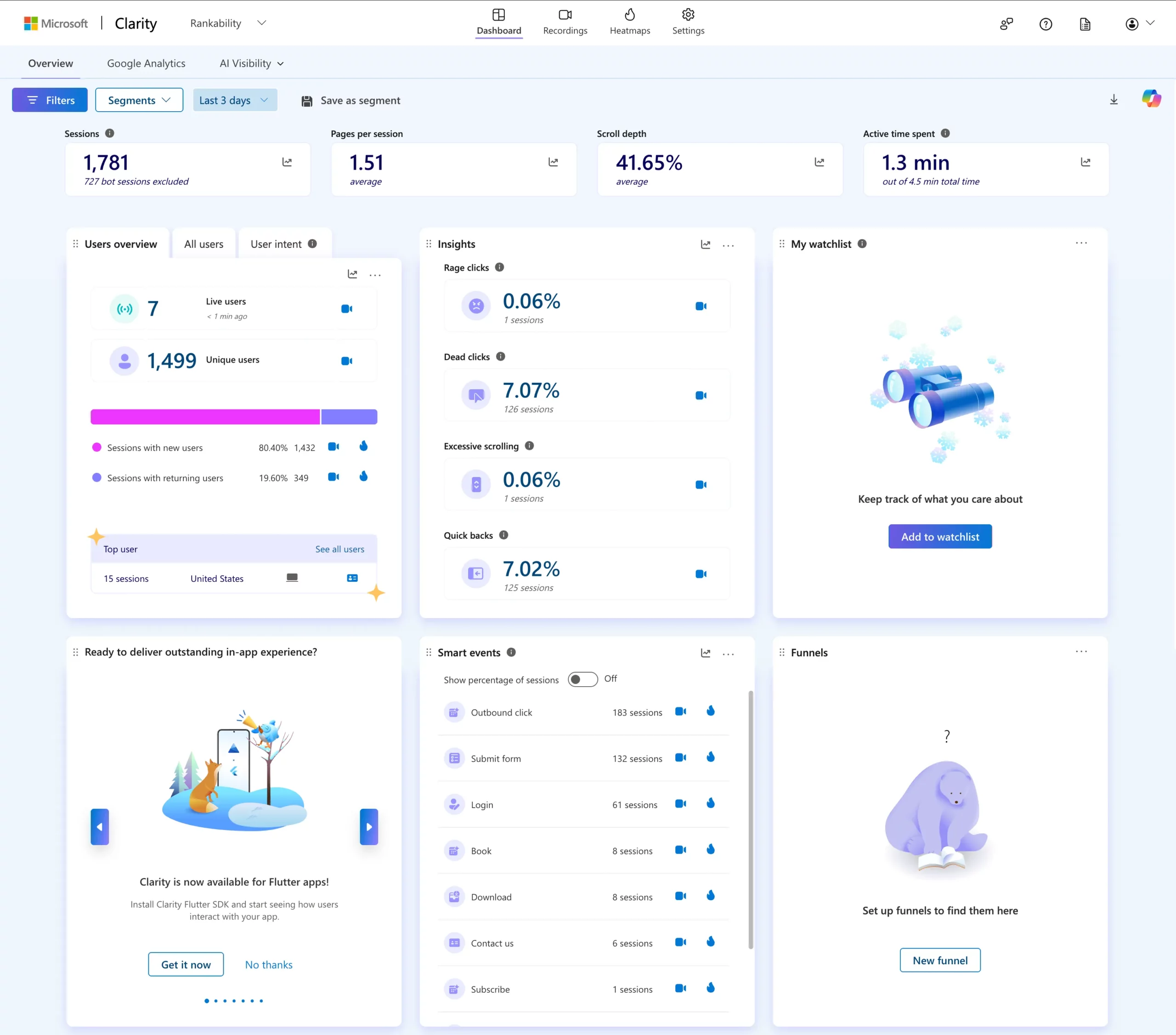
Session recordings: look for repeated friction
Review a sample of visits to high-value landing pages, especially mobile sessions. Look for visitors repeatedly tapping a button that does not respond, abandoning a long form, or missing essential details such as project capabilities, service areas or a direct contact method. One strange visit means little; recurring patterns deserve attention.
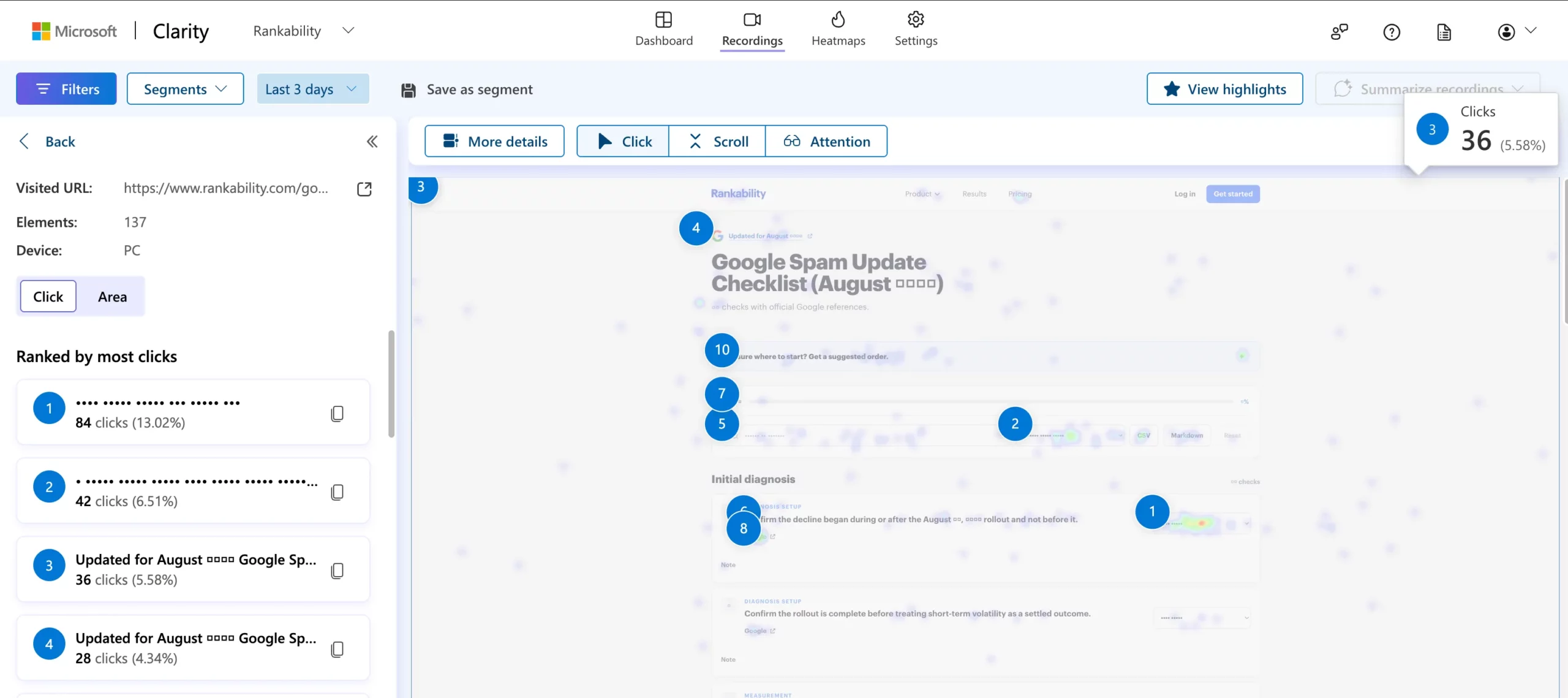
Heatmaps: examine attention and call-to-action placement
Scroll and click heatmaps can show how far visitors travel down the page and which elements attract interactions. When a key call to action is consistently overlooked, improve its clarity or placement, then measure whether genuine conversion events change.
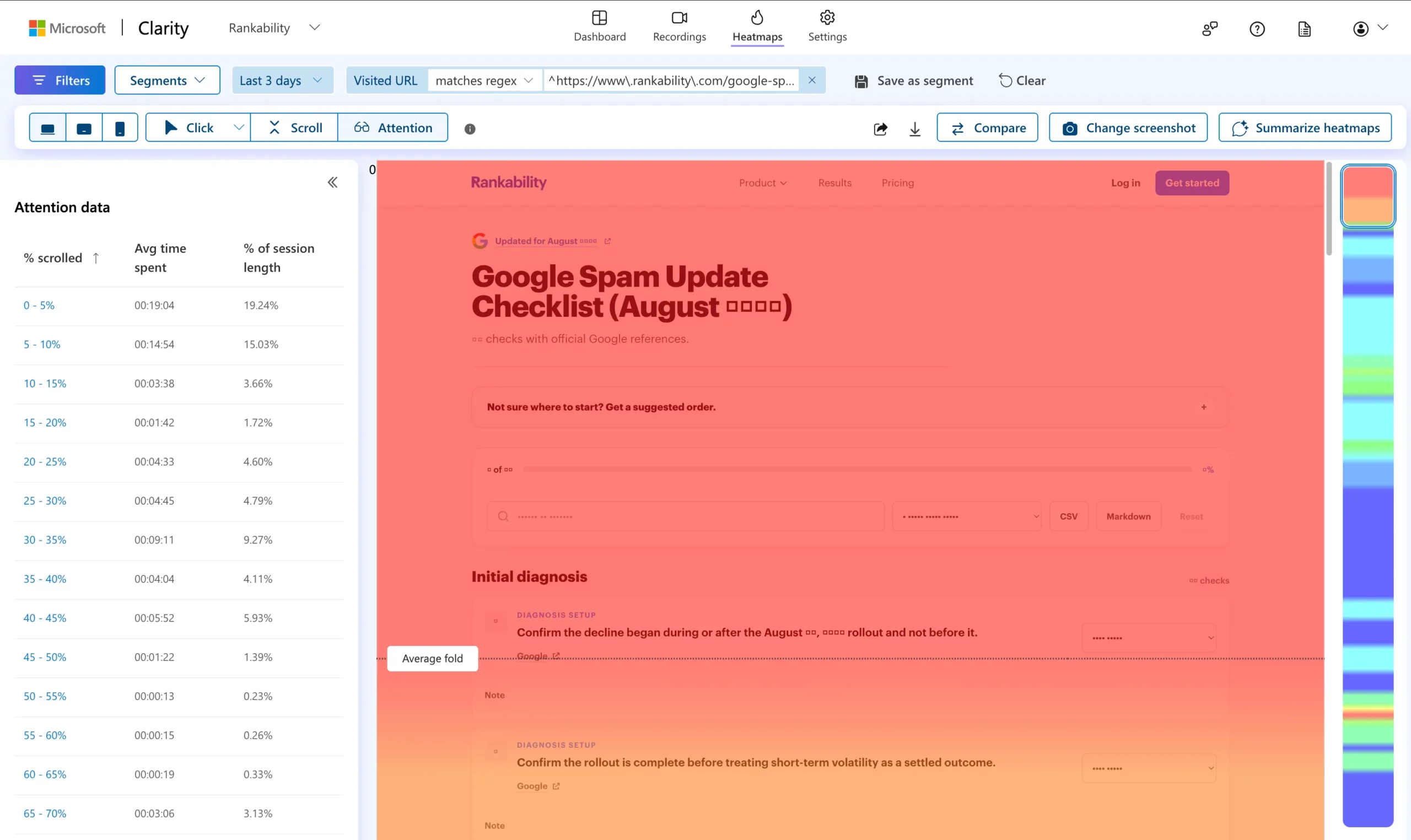
AI-related visibility indicators
Clarity also surfaces AI-related visibility information in some reporting experiences, including material tied to citations or bot activity. Treat those as directional signals: they should not be presented as a complete measurement of every AI answer engine or proof of an AI recommendation.

Agency scenario: A commercial cleaning landing page ranks for its service area yet receives few enquiries. Session observations may reveal that visitors cannot locate service coverage, expected response times or a clear quote button. Fixing those issues can be more useful than rewriting an already relevant H1.
Watch out for: collecting unnecessary personal information. Configure masking and privacy settings appropriately before enabling recordings.
5. Ahrefs — Competitor Visibility and Link Research
Ahrefs is particularly useful when an agency needs to understand the competitive landscape: which topics bring competing sites visibility, which pages attract links and which referring domains might be relevant to a client. Its third-party databases expand your market view, but their traffic and keyword estimates should not be mistaken for a client’s first-party results.
Content gap: discover missing commercial topics
Compare a website with businesses serving the same customers. Search for topics competitors cover that your client does not. Then separate the opportunities into service pages, location pages, comparison content, product pages and informational resources. A missing keyword is only useful if it represents demand the business can serve.

Lower-competition SERPs: evaluate the actual pages
Filters that surface lower-authority domains can reveal interesting search results. However, an apparently weak domain does not prove the keyword will be easy. Read the pages already ranking, inspect their relevance and consider search intent, geography and brand preference.


Link research: prioritize relevance over volume
Investigate how credible competitors earn mentions from trade publications, business directories, suppliers, chambers or industry resources. Build a shortlist of legitimate placements, then decide which relationships your client can genuinely support. This works better than treating every discovered backlink as a target.
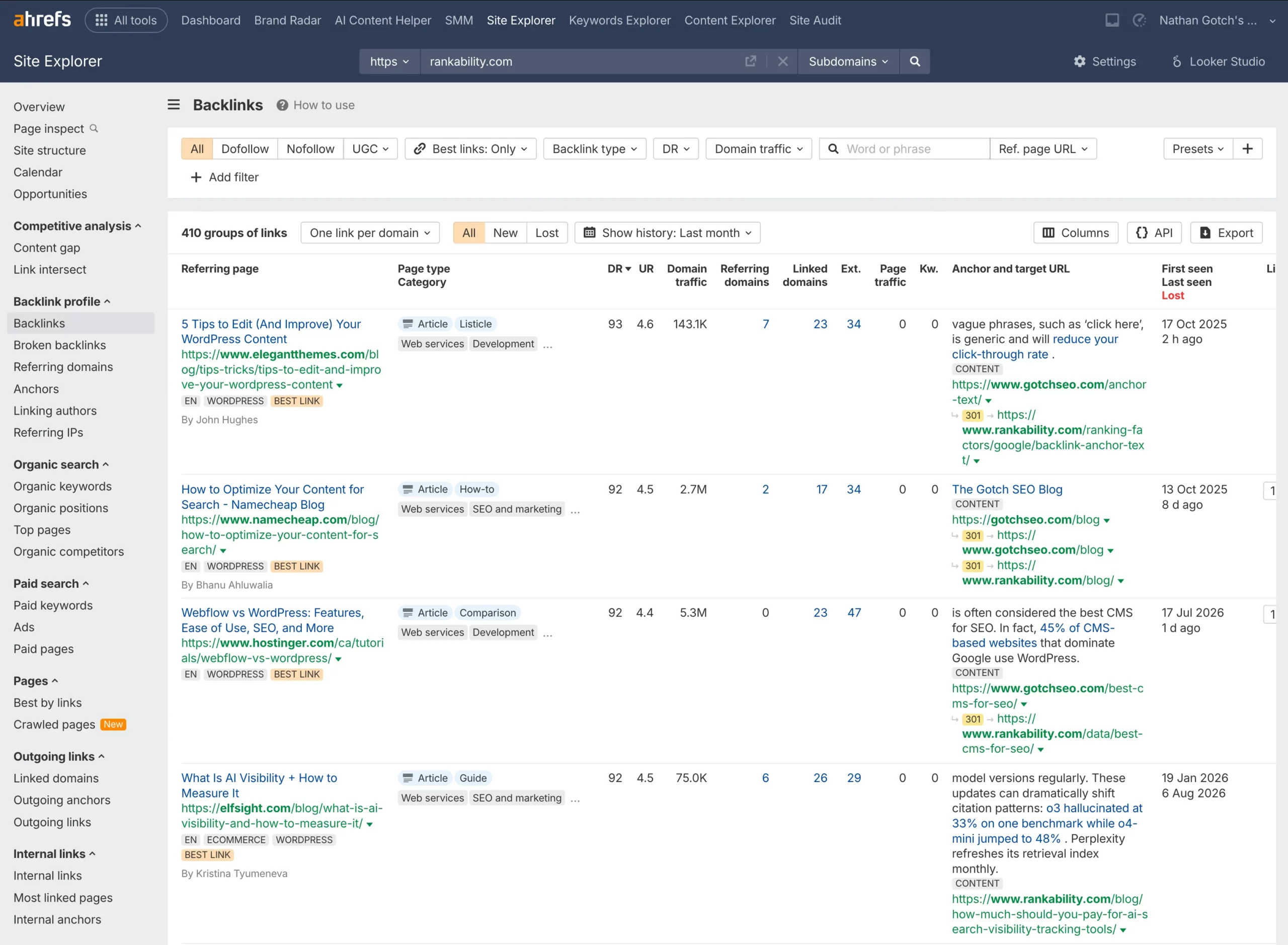
Agency scenario: An industrial contractor lacks mentions from local sector publications while peers have project announcements and industry association listings. That points to an opportunity for genuine PR and relationship building—not an automated link blast.
Watch out for: buying access to an expensive dataset without a consistent research and outreach process. The database does not build relationships for you.
6. Semrush — Turn Competitor Research into Monthly Priorities
Semrush combines keyword research, organic competitor analysis, backlink discovery and other marketing functions. For an agency serving multiple sectors, the advantage is the ability to investigate different search markets in one environment. Start from the business question you need answered; otherwise, there are too many reports to review without taking action.
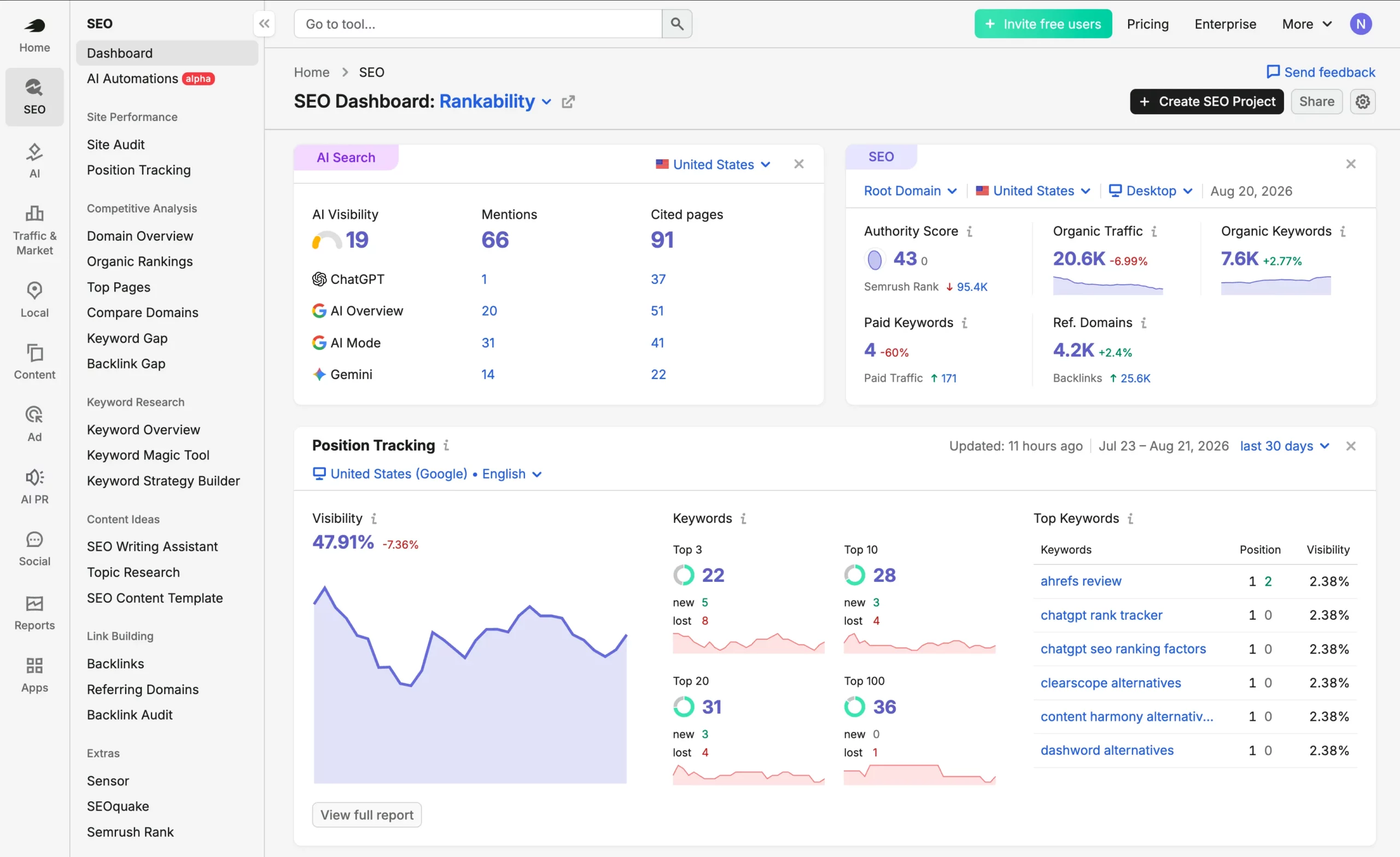
Find pages already within reach
Review the domain’s existing organic keywords and filter for relevant phrases that already have visibility but have not achieved strong positions. Do not optimize blindly: validate the query in Search Console where possible and check whether the page needs stronger examples, clearer headings, internal links or a more persuasive offer.
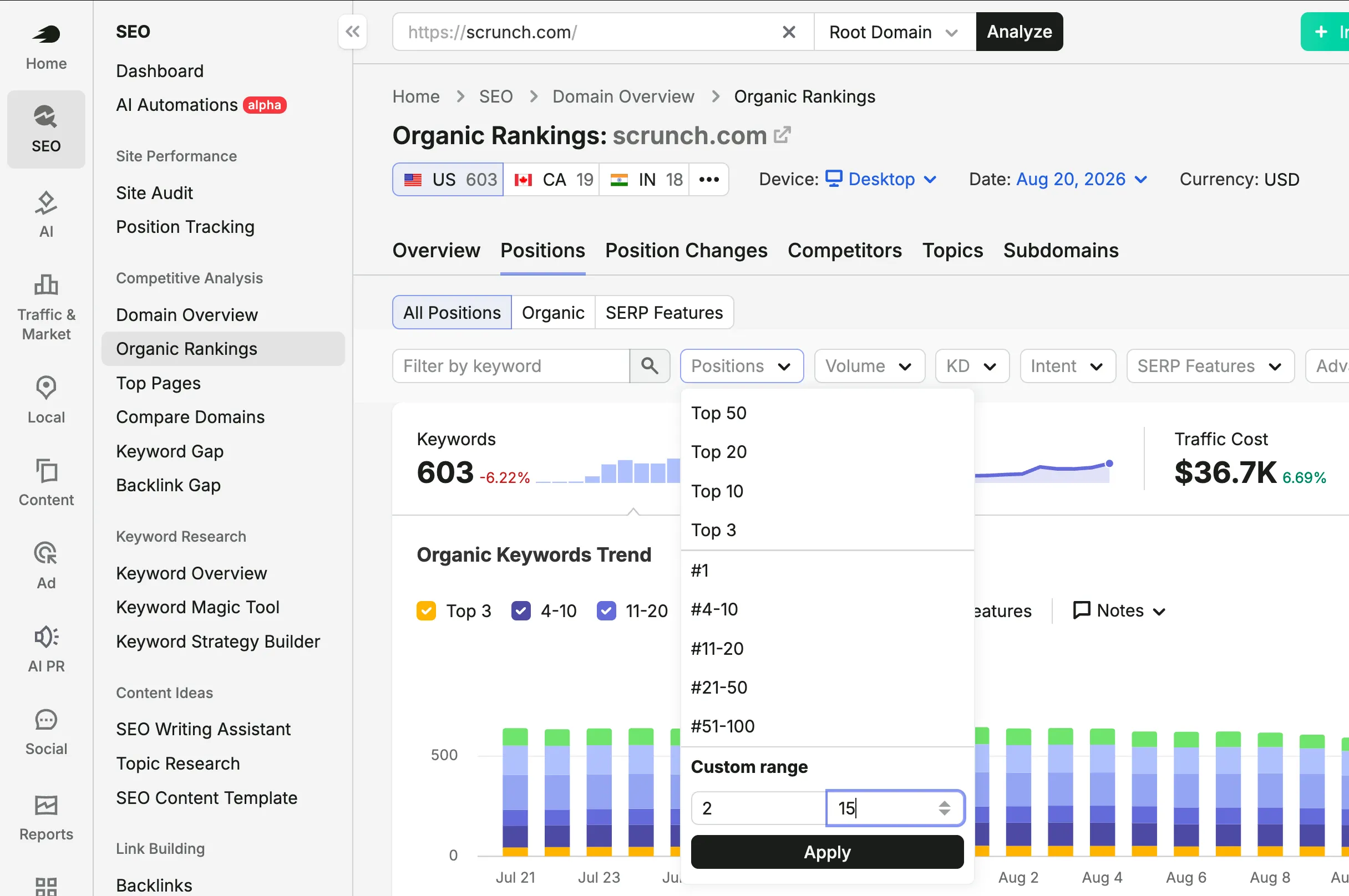
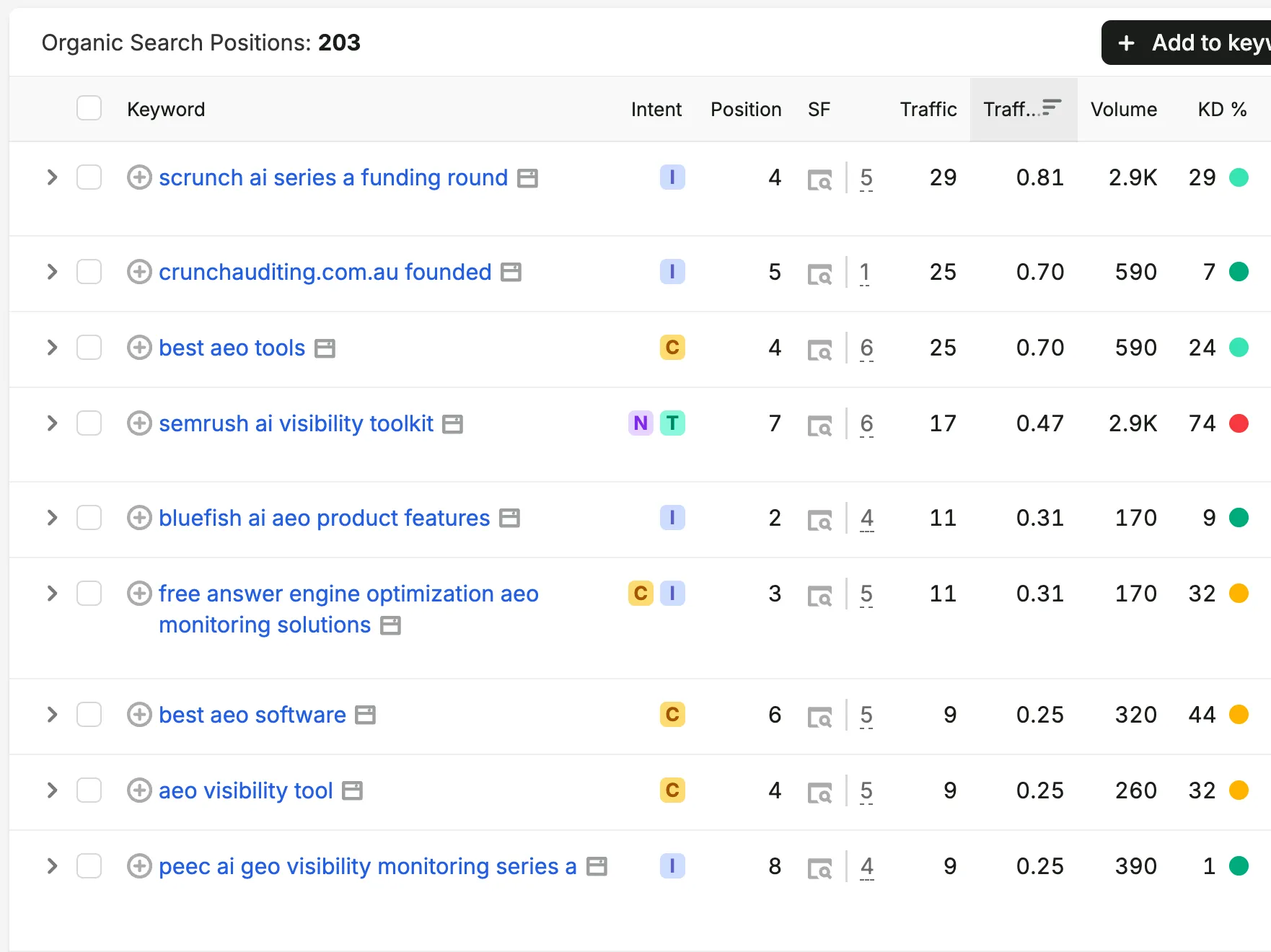
Discover untapped topics
A keyword gap comparison can reveal important subjects addressed by competing websites. Organize the findings around business offers rather than publishing one page for every variation. For a contractor, “warehouse building contractor” and “industrial warehouse construction” may belong to the same service-intent cluster instead of two thin pages.


Review competitor backlink opportunities
Backlink gap research is useful for discovering relevant industry websites you may have missed. Evaluate each site for quality, business relevance and whether there is a legitimate reason to be listed or mentioned. Keep outreach personalized and avoid promises of ranking gains from a specific link.

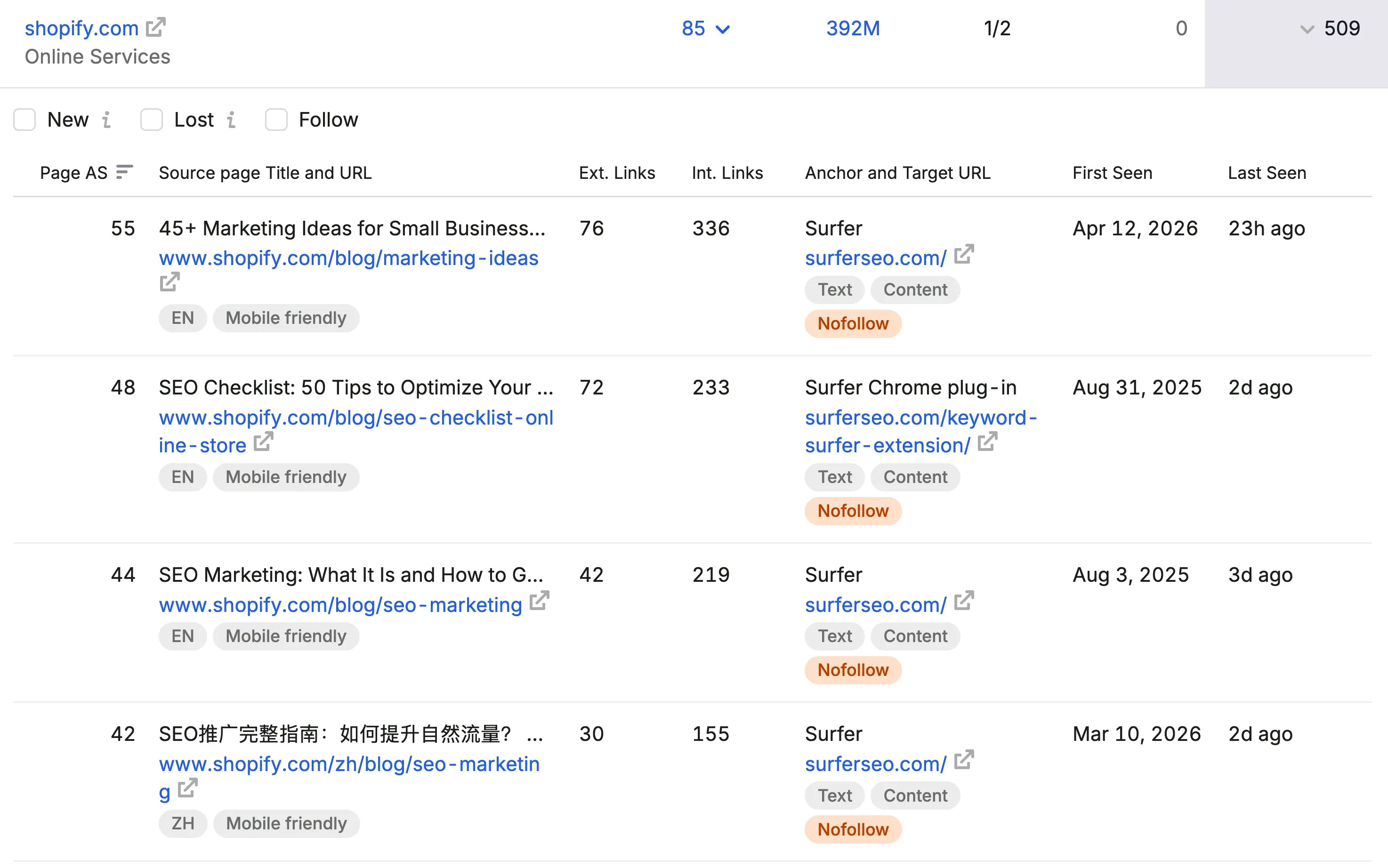
Agency scenario: A kitchen and bath remodeling client has one general services page. Competitor analysis reveals demand for countertop installation, bathroom remodeling and location-specific services. That research becomes a prioritized landing-page plan—not just a list of 200 keywords.
Watch out for: overlapping tool spend if Ahrefs is already doing the research you need. Choose based on your team’s actual use cases and data coverage.
7. Screaming Frog — Audit What Search Engines and Visitors Can Reach
Screaming Frog SEO Spider is a technical crawling tool that helps agencies build a reliable inventory of website URLs, link relationships, status codes, metadata, canonicals, redirects and many other signals. It becomes especially valuable during migrations, large-scale content refreshes and audits of sites built with WordPress or other CMS platforms.
A crawl should answer an operational question. For example: Which important pages are too far from the main navigation? Which service pages have almost no internal links? Which redirects form unnecessary chains? Which pages have indexing directives that conflict with the intended strategy?
Check crawl depth and architecture
Sort by crawl depth, but do not impose a rigid universal limit. A key money page buried several clicks deep may deserve more prominent navigation and contextual links. A long-tail archive page can reasonably have a different structure. Review importance and intent rather than treating a spreadsheet threshold as a rule.
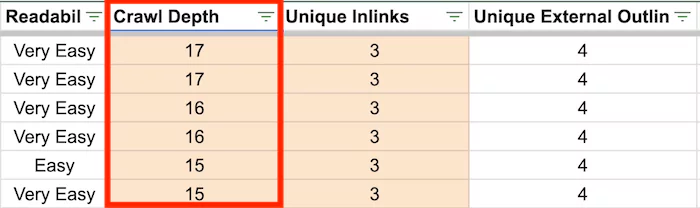
Find internal linking weaknesses
Inspect pages with few contextual incoming links, especially those that matter to the sales funnel. Relevant links from service hubs, industry pages and supporting articles help users find information and can clarify the site architecture.
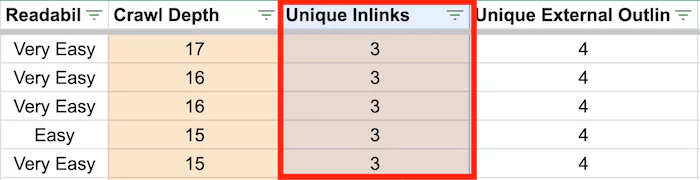
Connect SEO and engagement data
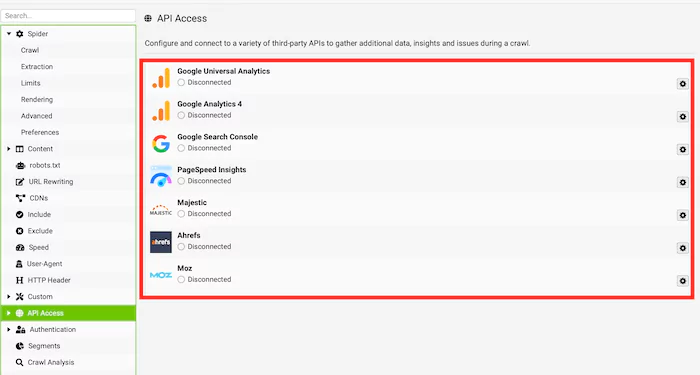
Where your setup and permissions allow, connecting search and analytics APIs can help combine technical inventory with performance signals. Use these inputs to identify pages that have no visible search demand, weak engagement or duplicate intent—and review them individually before deleting anything.
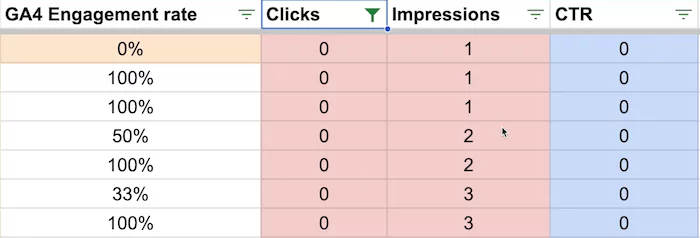
- Improve: Refresh a valuable page that lacks useful detail, examples or a clear next step.
- Consolidate: Merge overlapping pages when they serve the same intent and a single page would be more helpful.
- Redirect: Preserve appropriate destinations when retiring a URL with a close replacement.
- Remove: Delete content only after reviewing links, traffic, intent and possible users; 404 responses are not a shortcut for every weak page.
Agency scenario: A WordPress services site contains orphaned pages, duplicate titles and years of old landing pages. A structured crawl turns an unclear problem into a prioritized cleanup list with URL-by-URL decisions.
Watch out for: bulk redirects and mass content deletion without mapping intended search behavior. Automated findings are a starting point, not permission to change hundreds of URLs blindly.
8. PostHog — Understand Multi-Step Visitor Journeys
PostHog is generally associated with product analytics, but its event and funnel approach can help some agencies understand complicated websites. It is most compelling when a visitor must complete several steps before becoming a qualified opportunity, such as selecting a service, using a calculator, finishing onboarding or moving through a quote wizard.
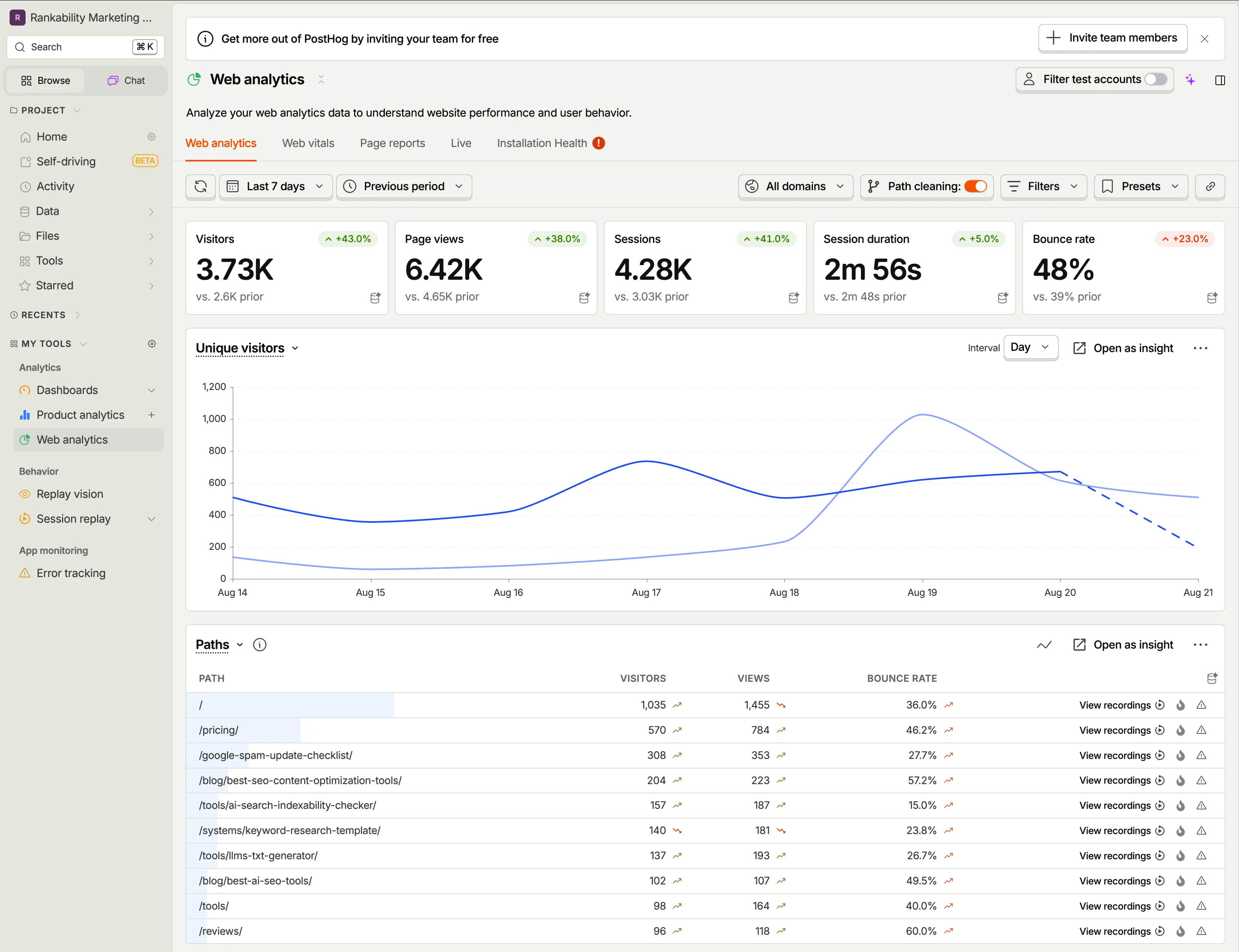
For a simple brochure website, GA4 and Clarity may be sufficient. PostHog becomes more attractive when the team needs granular event sequences, feature usage or product behavior tied to a conversion process. The right implementation requires a thoughtful event taxonomy, consent and privacy practices, and time to maintain the data.
Agency scenario: A B2B platform invites visitors to use a project estimator before scheduling a consultation. Funnel analysis may show that many visitors start the estimator but abandon a particular step. That is a product and conversion problem, not necessarily a search-ranking problem.
Watch out for: implementing complex instrumentation just because the platform is powerful. Start with the questions the sales or product team must answer.
9. Claude for Content Design — Make SEO Content Easier to Use
Claude and related AI-assisted design workflows can help marketers turn outlines, diagrams and campaign findings into visual explanations. For content-heavy agencies, the opportunity is broader than decoration: clearer diagrams, comparison visuals and illustrations can make specialized information easier to understand.
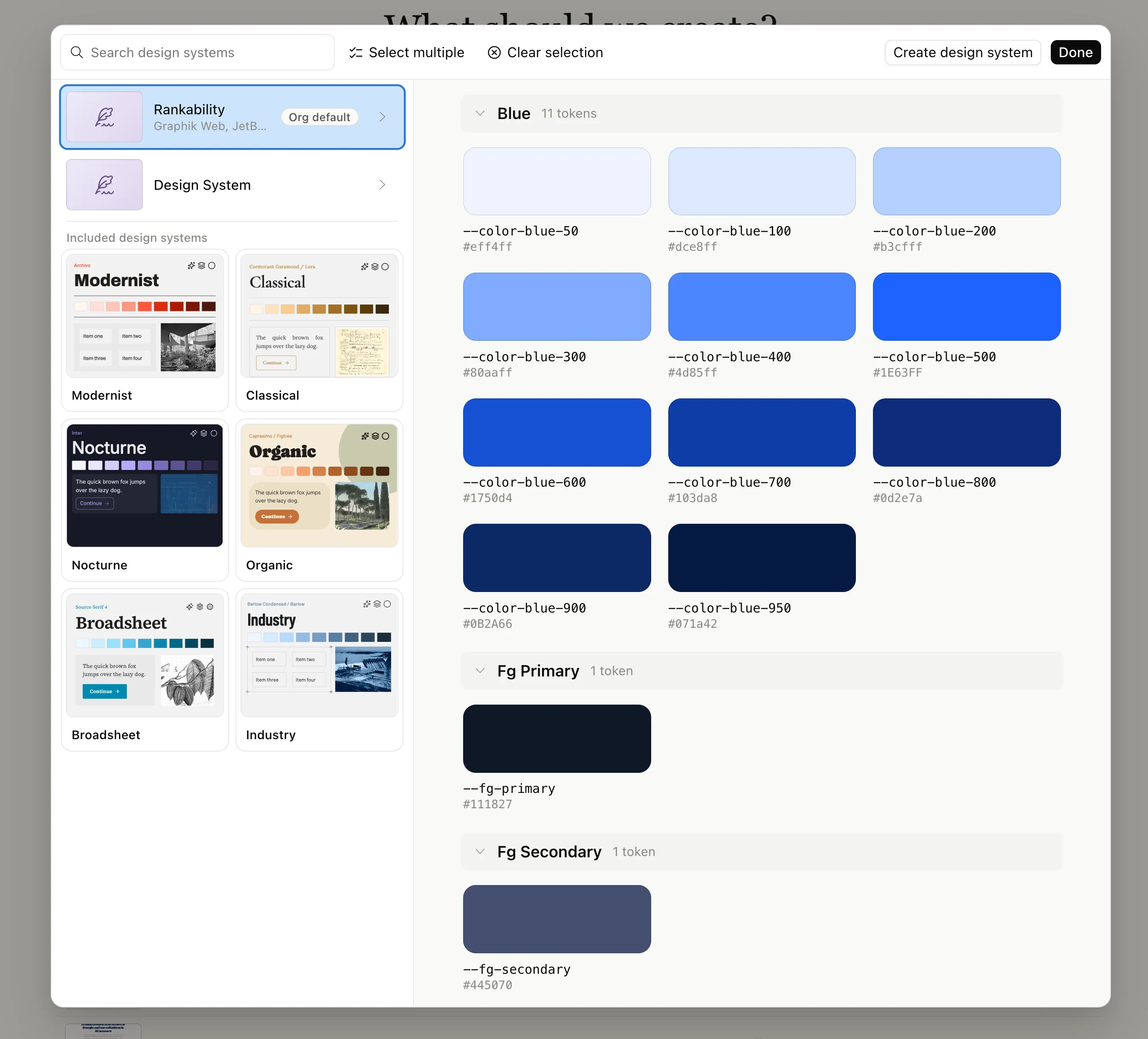
An industrial service page might need a simple project timeline graphic. A technical blog article may benefit from a process diagram that explains design, approvals, fabrication and construction. A case study may need a before-and-after layout showing measurable changes. The output still requires human verification, brand review and appropriate rights to all visual assets.
Agency scenario: A construction company has strong project expertise but dense, difficult-to-read pages. A concise visual breakdown of its delivery process helps visitors understand what the company does before contacting the team.
Watch out for: AI-generated diagrams that look authoritative but invent statistics, client projects, software interfaces or credentials. Every factual statement and image claim should be checked.
10. ChatGPT, Claude or Codex — The Analysis and Execution Layer
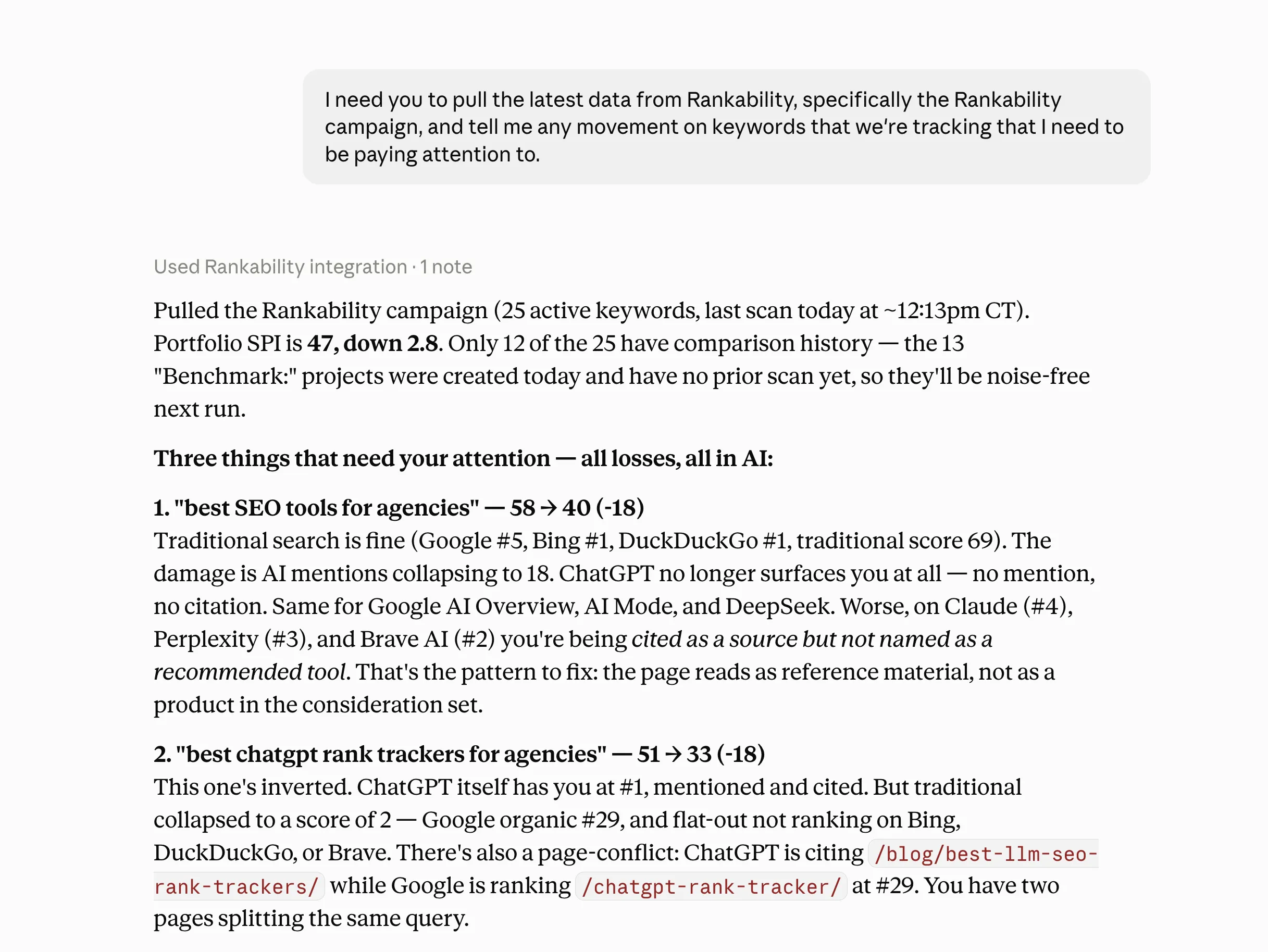
An AI assistant can support nearly every stage of a modern agency workflow: turning crawl exports into an issue list, clustering commercial keywords, drafting page outlines, explaining analytics patterns, preparing structured data, or helping automate repeatable reporting. Popular options include ChatGPT, Claude, and coding-focused assistants such as Codex. They are not a substitute for reliable source data or professional judgment.
Use real evidence as the input
A vague instruction such as “improve this website’s SEO” invites generic advice. A stronger request includes the exact service page, search queries, impressions, technical findings, conversion events and competitors. The assistant can then distinguish what the evidence shows from hypotheses that still need testing.
Connect tools carefully
Some platforms offer APIs or Model Context Protocol (MCP) integrations that allow AI systems to use external data and tools. This can reduce repetitive exports, but access should be scoped to the appropriate clients and permissions. Keep review checkpoints for publishing content, sending outreach, editing sites and changing analytics configurations.
Useful repeatable tasks
- Convert a crawl export into a prioritized technical SEO ticket list.
- Group Search Console queries by service intent and location.
- Draft SEO briefs that emphasize useful expertise and conversion pathways.
- Compare monthly lead events while clearly marking missing or incomplete tracking.
- Build client-friendly explanations of what changed and what the team will do next.
Agency scenario: A team supports several service companies and receives recurring reports in CSV format. An assistant can help summarize the evidence and prepare task briefs; the strategist checks the data, makes the final prioritization and communicates the business impact.
Watch out for: invented rankings, fabricated competitor facts, stale product capabilities and confidential information placed into an inappropriate workspace. Require citations back to campaign evidence.
Five More SEO Tools Worth Considering
Detailed SEO Extension — Faster On-Page Checks
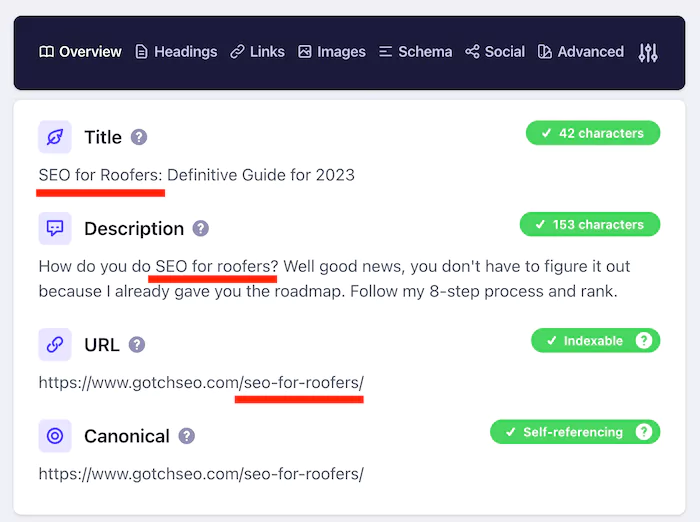
Detailed SEO Extension is a convenient browser companion when a specialist wants to inspect page titles, descriptions, headings, canonicals and other visible on-page signals without launching a full crawl. It is particularly useful for live competitor reviews or quick page checks during a call. It cannot replace a site-wide technical audit.
Bing Webmaster Tools — Another First-Party Search Perspective
Bing Webmaster Tools can supplement the Google-centered perspective. It provides information about how Bing discovers and processes a website, and it is worth considering when the client’s audience may use Microsoft products or alternative search environments. Do not assume Bing data is interchangeable with Google performance.
SEOTesting — Document Changes and Compare Outcomes
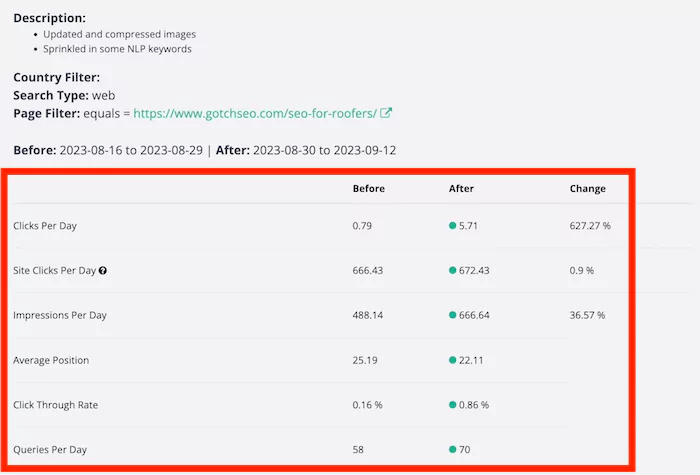
SEOTesting can help teams track SEO experiments and analyze performance changes over defined periods. Useful tests include restructuring a service page, expanding a case-study section or improving internal linking. Avoid announcing “a win” without considering seasonality, concurrent changes and the small sample sizes common in B2B SEO.
Looker Studio — Build Reports Around the Client
Looker Studio is well suited to reporting teams that want customizable dashboards built from available sources. For example, you can highlight organic landing pages, Google Search Console visibility and lead events in one client-oriented view. Plan for time spent maintaining connectors, calculations and permission settings.
AgencyAnalytics — Present Cross-Channel Progress
AgencyAnalytics focuses on bringing multiple marketing data sources into client dashboards and reporting workflows. It can be helpful for agencies that provide SEO alongside paid media or other channels and need a repeatable presentation layer. Evaluate the cost against the number of accounts, integrations and custom reporting needs.
Recommended SEO Stacks for Different Agency Models
You do not need the same software budget for every business model. The combinations below are operational starting points, not a claim that each subscription is necessary for a successful campaign.
| Agency model | Core tools | When to add more |
|---|---|---|
| Solo SEO consultant | Search Console + GA4 + Clarity + a spreadsheet | Add Screaming Frog for audits and a research suite for competitive projects |
| Local SEO agency | Search Console + GA4 + Clarity + Screaming Frog | Add rank/local presence monitoring and reporting as location count grows |
| B2B / industrial lead generation | Search Console + GA4 + Clarity + one competitive research suite | Add better CRM attribution and product analytics for long buying journeys |
| White-label delivery partner | Technical crawler + one research suite + clear task tracking | Add a branded reporting tool when the partner needs recurring client-facing dashboards |
| Content-intensive agency | Search Console + an SEO content workflow + AI writing/design assistance | Add controlled testing as traffic and page count increase |
For an agency growing from five clients to fifty, repeatability matters as much as feature depth. Standardize what an audit looks like, who approves a change, how lead events are named, and how recommendations become client-facing priorities before adding another platform.
A Practical Monthly SEO Workflow: From Search Data to More Leads
Here is a repeatable process for a contractor, industrial supplier or another business selling a valuable service. It deliberately starts with customer demand and ends with measurable action.
- Validate the offer: List the services and markets that generate revenue, and identify the specific type of enquiry that matters.
- Confirm measurement: Check Search Console, GA4 events, form submissions and any CRM attribution; correct obvious tracking gaps.
- Review demand: Find existing high-intent queries and the landing pages Google associates with them.
- Check competitive context: Use Semrush or Ahrefs to understand page types, topics and relevant industry mentions.
- Audit barriers: Crawl the website with Screaming Frog and identify indexability, navigation, internal linking and content issues.
- Observe the user experience: Use Clarity to discover avoidable friction on service pages that already receive relevant visitors.
- Make focused changes: Improve one service cluster at a time—content, proof, calls to action, internal links and technical issues.
- Measure and report: Compare relevant search visibility, enquiries and completed actions. Record what changed and what remains uncertain.
An agency that executes this cycle consistently has a much stronger foundation than an agency that purchases a new tool every time rankings fluctuate. The objective is not to produce more data. It is to make the next useful decision easier.
What We Would Include in a Client-Friendly SEO Report
A report should tell the story of progress without forcing a business owner to interpret SEO terminology. The format can be short if it answers the questions that actually affect investment decisions.
- Commercial objectives: The services, locations and types of enquiries the campaign targets.
- Search opportunities: Notable movement in qualified non-branded search demand and important service pages.
- Lead indicators: Form submissions, meaningful calls, booking requests and any known qualification outcomes.
- Work completed: The content, technical changes, internal links, local SEO and reputation activity delivered.
- Next priorities: A short explanation of the highest-impact actions planned for the following month.
- Limitations: Tracking gaps, seasonality, attribution uncertainty and any results that cannot yet be connected to revenue.
A keyword moving up several positions is worth reporting when it represents the client’s real services. A lead that becomes a sales conversation is even more informative. For high-ticket B2B work, it is important to recognize that one qualified opportunity may have more business value than a large number of untargeted visits.
Common Mistakes When Agencies Buy SEO Software
- Too many overlapping subscriptions: Paying for several keyword databases without giving staff time to use them.
- Overpromising from estimates: Showing third-party traffic estimates as verified site performance.
- Automating without review: Allowing AI outputs to publish unverified claims or change URLs without approval.
- Ignoring the conversion path: Increasing visibility for pages that do not help visitors contact the business.
- Replacing strategy with dashboards: Reporting charts without a clear recommendation or owner for the next step.
Frequently Asked Questions About SEO Agency Tools
What are the essential SEO tools for a small agency?
Google Search Console, Google Analytics 4 and Microsoft Clarity form a useful low-cost measurement foundation. Add a crawler for technical projects and a competitive research suite when client needs justify it.
Is Semrush better than Ahrefs for agencies?
Neither is universally better. Both support competitive SEO research with different interfaces, databases and workflow strengths. Choose the one your team will use for the specific research you deliver, and validate critical findings with first-party data.
Can AI replace an SEO specialist?
AI can speed up research, documentation and some implementation work, but it does not independently verify business context, lead quality, technical risk or client promises. Professional review remains necessary.
Do agencies need both GA4 and Search Console?
They answer different questions. Search Console reports how a verified property appears in Google Search; GA4 helps measure what people do after arriving and which events they complete. Used together, they provide a better view of organic performance.
Do rankings guarantee more leads?
No. Rankings depend on query intent, geography, how search results appear and whether the landing page converts. Measure leads and sales outcomes alongside search visibility.
How often should an SEO agency review results?
Teams may monitor high-risk issues frequently, while detailed performance reviews typically benefit from a meaningful comparison period. Reporting cadence should reflect campaign maturity and conversion volume rather than reacting to daily position fluctuations.
What is the best affordable SEO stack for a local contractor?
Start with the free first-party tools for search and conversion evidence, use Clarity for page behavior, then add competitive research or local presence tools only when they solve an important outstanding need.
How do agencies use SEO tools for AI search visibility?
Track the search environments and citation or referral signals that your tools can actually measure. Improve factual service content, structured site organization and trust evidence, while avoiding unverified claims about broad AI coverage.
Final Recommendation: Build a System, Not a Subscription Collection
The best SEO stack is a connected process: Search Console reveals how people discover the site; GA4 and Clarity show what happens next; a crawler finds technical friction; a competitive suite reveals missing opportunities; and AI tools help the team turn evidence into executable work. The platforms will evolve, but the need for sound decisions and useful business outcomes will not.
If your agency needs a dependable SEO delivery partner or your B2B company wants more qualified search opportunities, explore Velautec Media. Our focus is practical SEO, local visibility, content, digital reputation and improvements that help search visitors become real conversations—not reports full of unexplained metrics.
