Why Isn’t My Google Business Profile Getting Calls? (And How to Fix It)
If your Google Business Profile is getting impressions but not generating calls, the problem isn’t visibility — it’s conversion. Ranking in Google is just step one. What actually drives leads is how…


If your Google Business Profile is getting impressions but not generating calls, the problem isn’t visibility — it’s conversion.
Ranking in Google is just step one. What actually drives leads is how your profile builds trust, communicates value, and pushes users to take action.
Most businesses lose potential customers at this exact stage.
🔍 Quick Answer
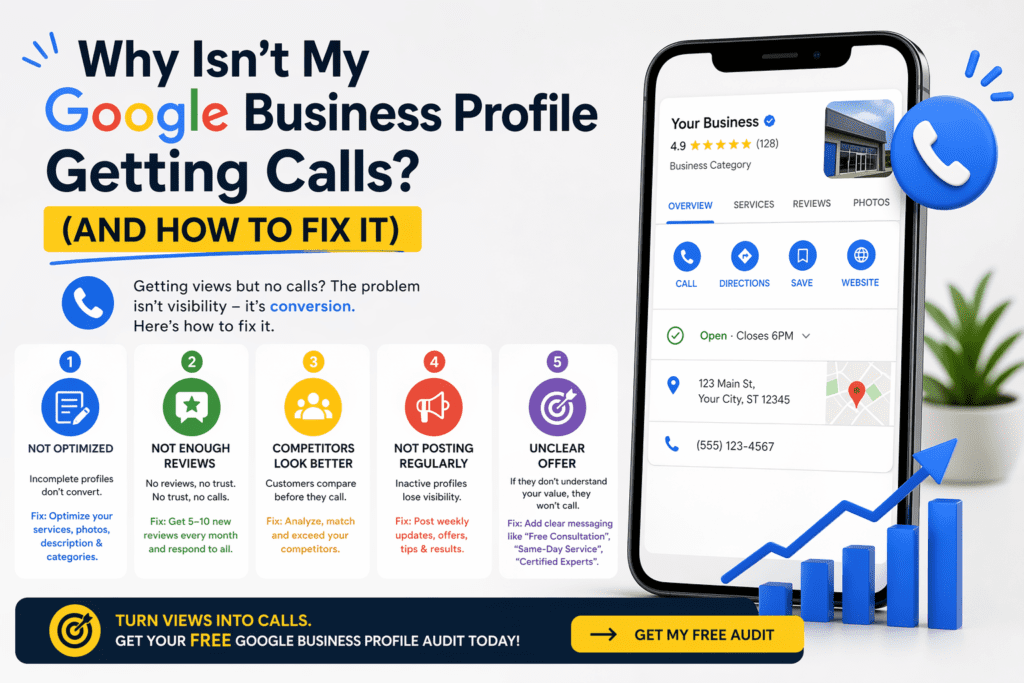
Your Google Business Profile isn’t getting calls because it’s not optimized to convert visitors into leads.
The most common issues are:
- Weak profile optimization
- Low or inconsistent reviews
- Stronger-looking competitors
- Lack of activity
- Unclear offer
❌ 1. Your Profile Isn’t Optimized for Conversions
Many profiles exist — but very few are built to convert.
If your profile looks basic, incomplete, or generic, users won’t feel confident reaching out.
👉 How to fix it:
- Add services with keyword-rich descriptions
- Upload real, high-quality photos (not stock images)
- Write a clear, benefit-driven business description
- Select the right primary and secondary categories
❌ 2. You Don’t Have Enough Reviews (or the Right Ones)
Reviews are your strongest trust signal.
If you have few reviews — or outdated ones — users will hesitate, even if you rank well.
👉 How to fix it:
- Build a simple system to request reviews after each job
- Aim for consistent growth (5–10 reviews per month)
- Encourage clients to mention specific services and results
- Always respond to every review
❌ 3. Your Competitors Look Stronger
Users don’t just click — they compare.
Even if you’re ranking in the top 3, a competitor with better reviews, photos, and messaging will win the call.
👉 How to fix it:
- Analyze the top 3 competitors in your area
- Compare:
- Number and quality of reviews
- Photos and branding
- Offers and messaging
- Match their level — then differentiate clearly
❌ 4. Your Profile Looks Inactive
An inactive profile signals a stagnant business.
Google also prioritizes profiles that show consistent activity.
👉 How to fix it:
- Publish weekly Google Posts
- Share:
- Completed projects
- Before/after results
- Tips or insights
- Promotions
- Keep your profile fresh and active
❌ 5. Your Offer Isn’t Clear
If users don’t immediately understand what you do — and why they should choose you — they won’t call.
Clarity beats everything.
👉 How to fix it:
Add strong, direct messaging like:
- “Free Consultation”
- “Same-Day Service Available”
- “Certified Experts”
- “Serving [Your City]”
Make your value obvious in seconds.
🚀 Turn Views Into Calls
Getting traffic to your Google Business Profile is only half the battle.
The real goal is turning that visibility into qualified leads and calls.
If your profile isn’t doing that yet, there’s a clear opportunity to improve — fast.
👉 Get a free Google Business Profile audit and we’ll show you exactly what’s missing and how to fix it.

SEO Specialist & Founder of Velautec | Local SEO & Lead Generation for Service Businesses
I help law firms, contractors, and service-based businesses dominate local search results and turn Google visibility into consistent leads.
Over the past 6+ years, I’ve led SEO strategies across international teams, focusing on high-impact improvements in rankings, traffic, and conversions. My work combines technical SEO, Google Business Profile optimization, and conversion-driven content to create systems that generate real business growth.
As the founder of Velautec, I work with businesses in the U.S. and Latin America to improve their online presence, increase inbound leads, and build long-term authority in their markets.